Fill the Blanks Expanded - Multiple Cloze Type-In

AnkiWeb addon 917616596

Transforms Anki cloze cards into multiple fill-in-the-blank input fields with instant color feedback, progress counters, hints, dropdowns, and duplicate-ordinal autofill.
AI-generated summary; may contain mistakes.

card-templatesclozequizfork-or-reupload

Open on AnkiWeb GitHub Find alternatives

AnkiWeb

Votes
0 (πŸ‘ 0 Β· πŸ‘Ž 0)
Updated
2026-02-01
Anki versions
2.1.1~
License
Not found (this does not mean that the addon has no license)
Virus scan
No ClamAV match A match does not prove malware. No match does not prove that the code is safe.
Languages
JavaScript, Python, JSON
Description language
en

Maintenance

stale

  • Last update or commit: 2026-02-04 (270 days before the snapshot).
  • Test files: 2.
  • The GitHub repo is shared with 1 other addon; its commits, issues and releases are not specific to this one.
  • Commits in the last year: 20.
  • Issues: 1 open, 0 closed.
  • Pull requests: 0 open, 0 merged.

Will it work on my Anki?

Version branches
Min AnkiMax AnkiUpdated
2.1.1+2026-02-01
History across monthly snapshots

Loading…

Similar addons

Quizify Tool

Renders Markdown in Anki cards as interactive question typesβ€”fill-in-the-blank, multiple choice, reveal, annotations, collapsible/tabbed blocks, recitation, audio, code and mathβ€”with editor tools and bulk Markdown import.

review-flowformattingcard-templatesclozequizmobile-compatible

2 votes 34% approval πŸ‘ 2 Β· πŸ‘Ž 0 ⭐ 171 Anki 2.1.1~ Updated 2025-02-16
Code Your Answer

Lets you type code answers in an IDE-style field during review and shows an instant character-level diff against the solution, with syntax highlighting and coding shortcuts.

formattingshortcutscard-templatesquiz

1 votes 21% approval πŸ‘ 1 Β· πŸ‘Ž 0 ⭐ 3 Anki 25.02.7~ Updated 2026-06-19

Description

Fill the Blanks Expanded

Transform your Anki cloze cards into interactive fill-in-the-blank exercises with multiple input fields.

Note: This is an enhanced fork of the original Fill the Blanks Expanded by ssricardo.

Features

✨ Multiple Type-In Fields

  • Replace {{cloze:Field}} with {{type:cloze:Field}} and get individual input fields for each cloze deletion
  • Type directly into each blank instead of a single large input box
  • Perfect for code snippets, formulas, language learning, and any content with multiple blanks

Example

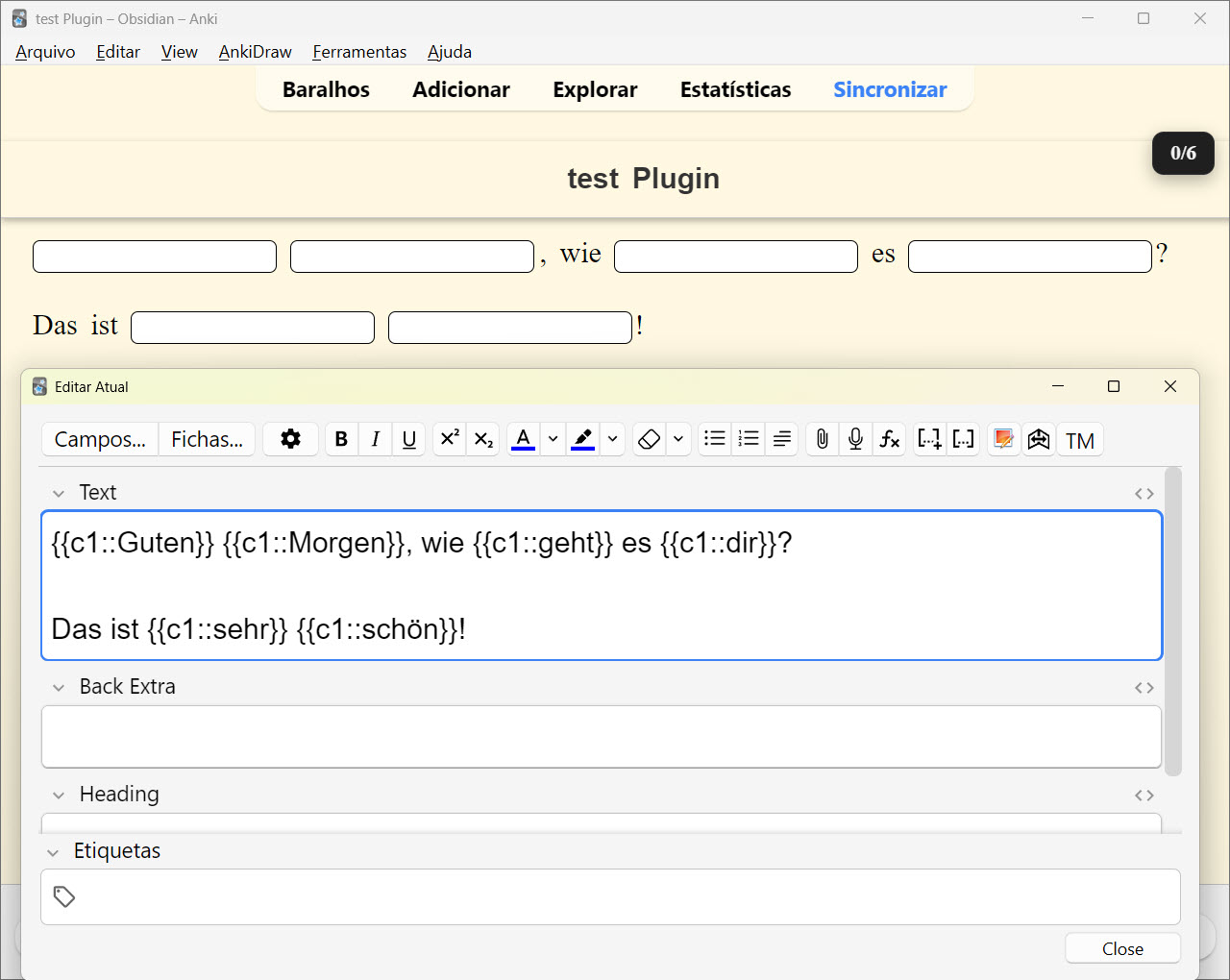
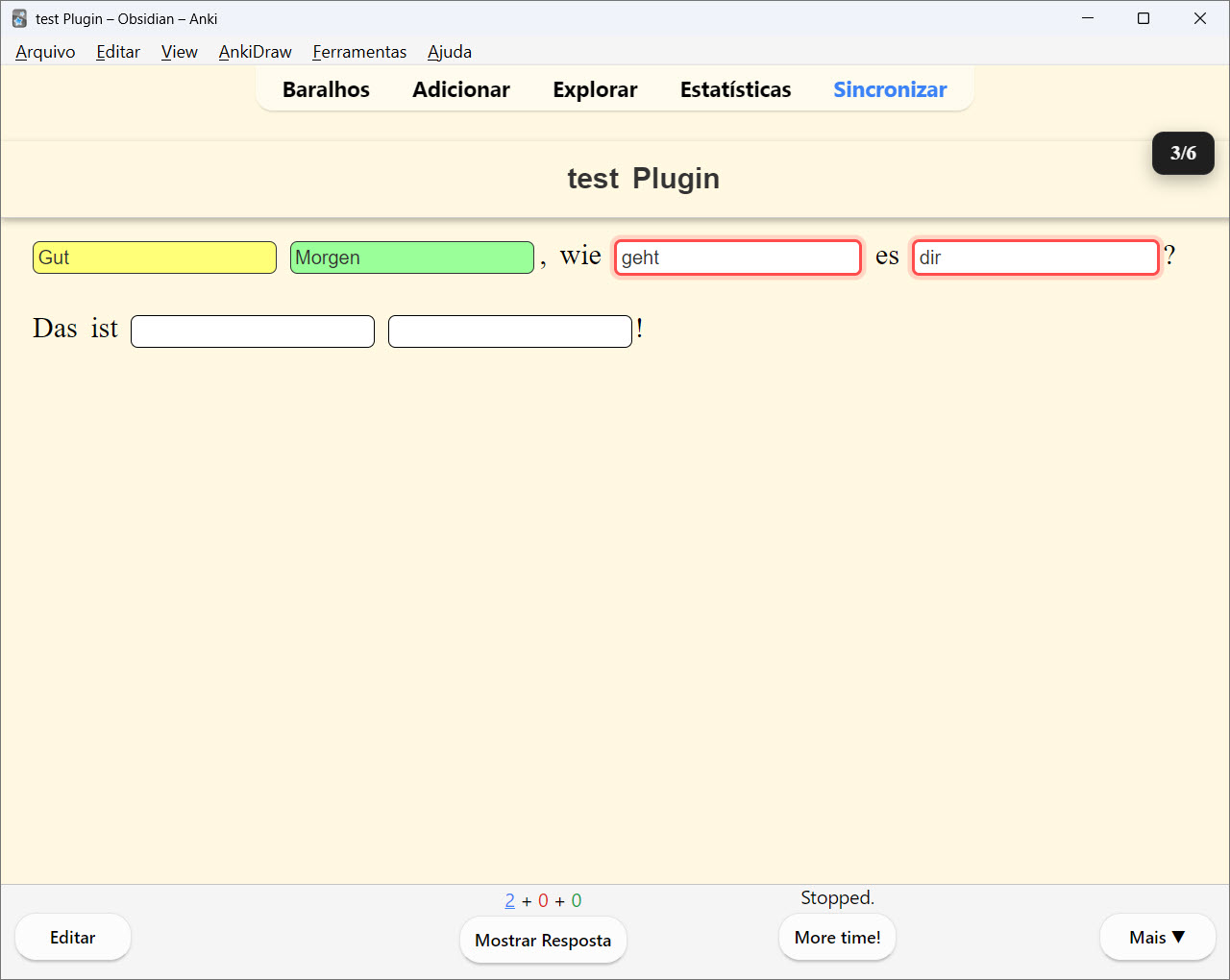
{{c1::Guten}} {{c2::Morgen}}, wie {{c3::geht}} es {{c4::dir}}?

Das ist {{c5::sehr}} {{c6::schΓΆn}}!
2026-01-30_19-03-16 2026-01-30_19-03-24 2026-01-30_19-03-33 2026-01-30_19-03-47 2026-01-30_19-04-08 2026-01-31_21-24-50 2026-01-31_21-29-45

🎯 Instant Feedback

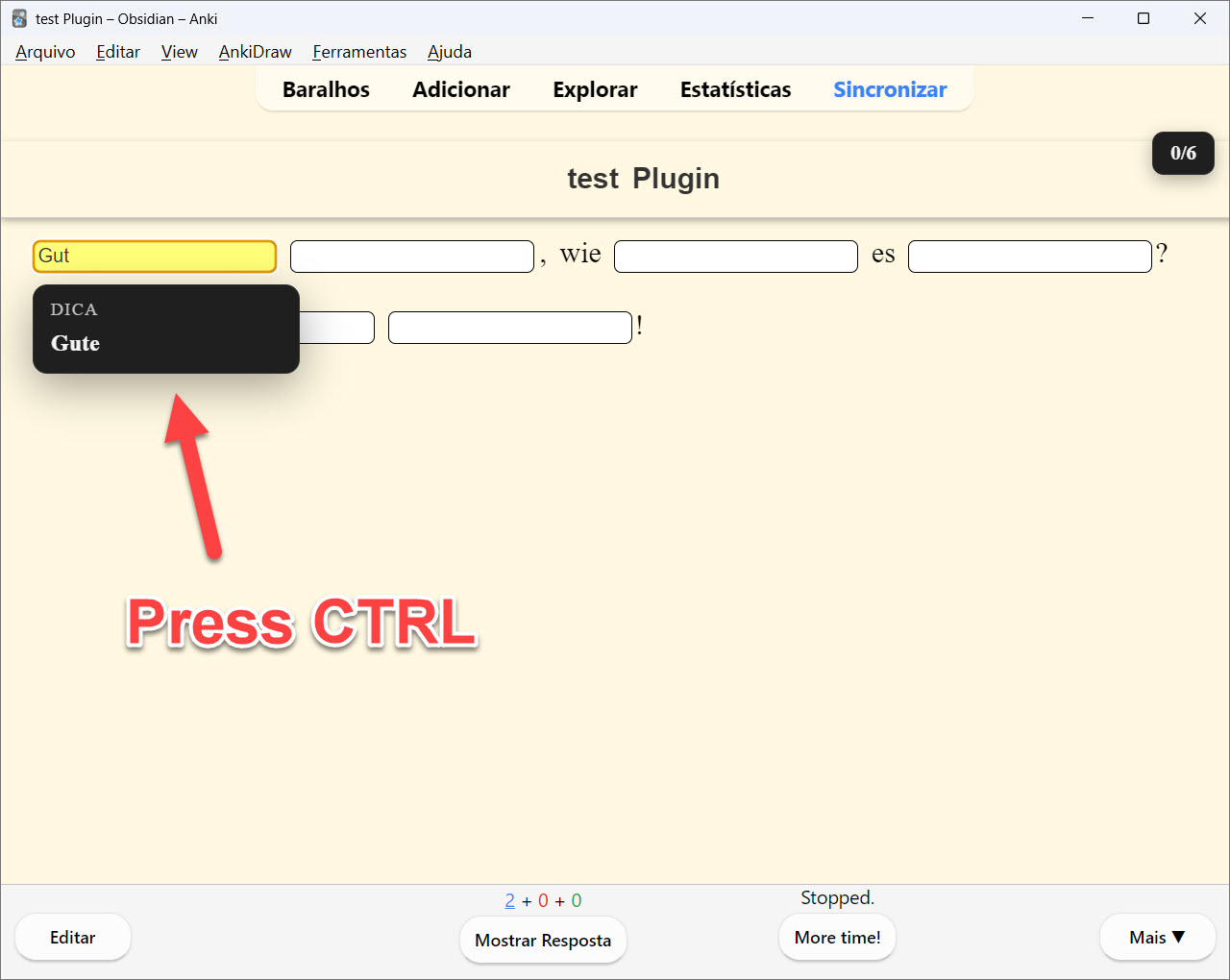
Real-time color-coded feedback as you type:

  • Yellow - Incomplete (correct so far)
  • Green - Correct answer
  • Red - Incorrect answer

πŸ“Š Progress Indicator

  • Visual counter showing answered/total fields (e.g., "2/5")
  • Located in the top-right corner
  • Turns green when all answers are complete

πŸ’‘ Smart Hints

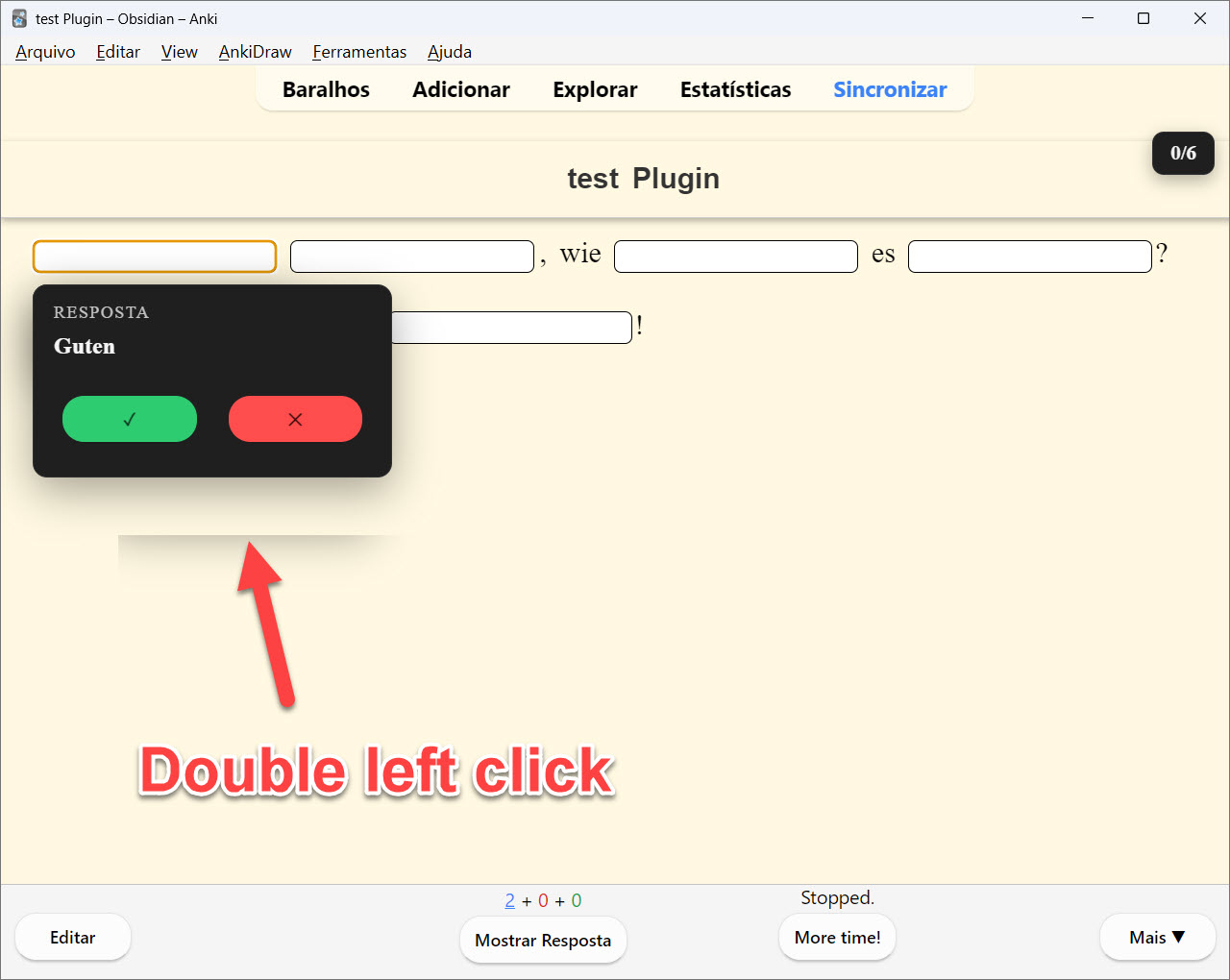
  • Double-click any field to reveal the answer
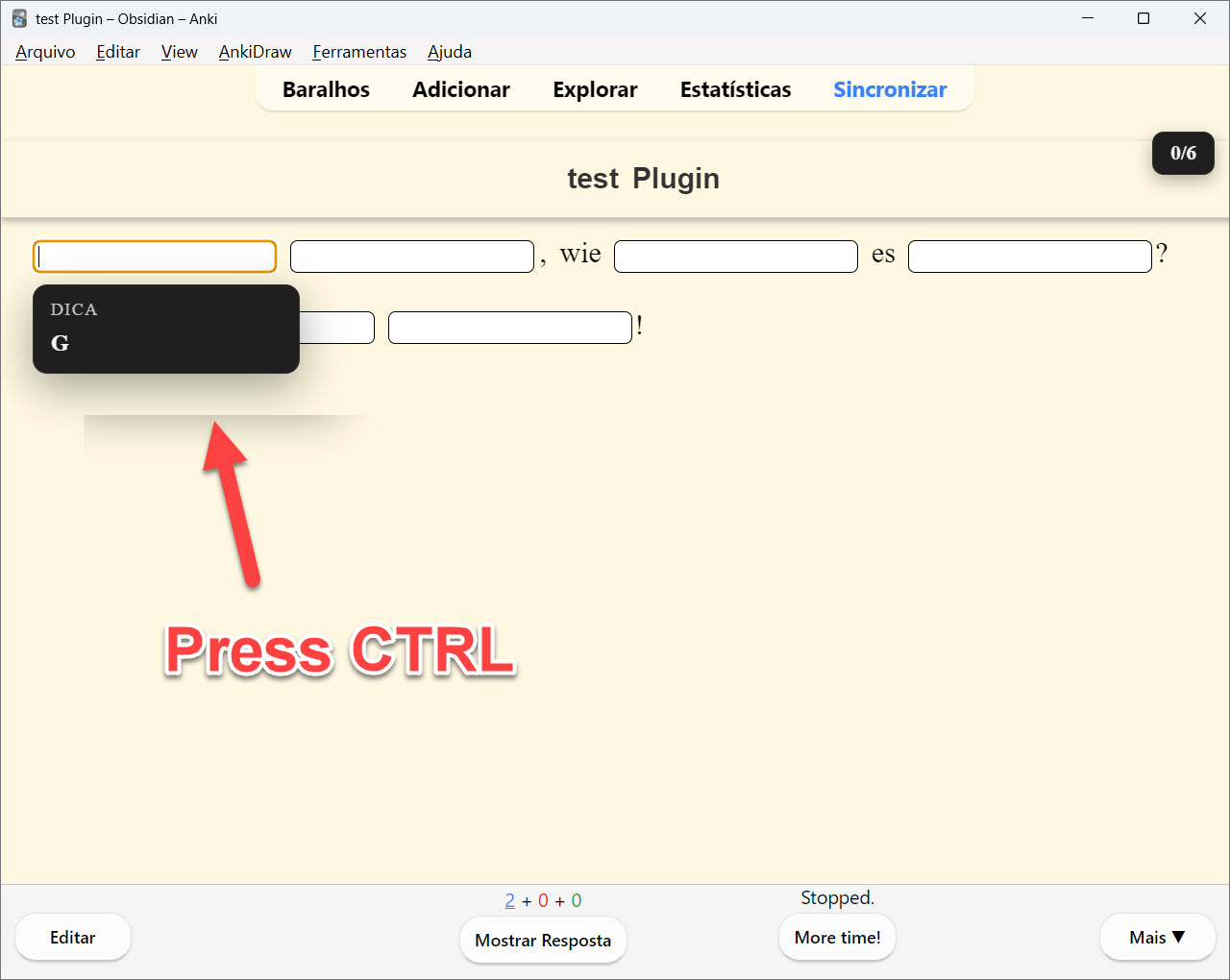
  • Ctrl+? to get the next character hint
  • Configurable idle hint delays

🌍 Language Support

  • Ignore case sensitivity option
  • Ignore accents/diacritics option
  • Asian characters support

🎨 Dropdown Support

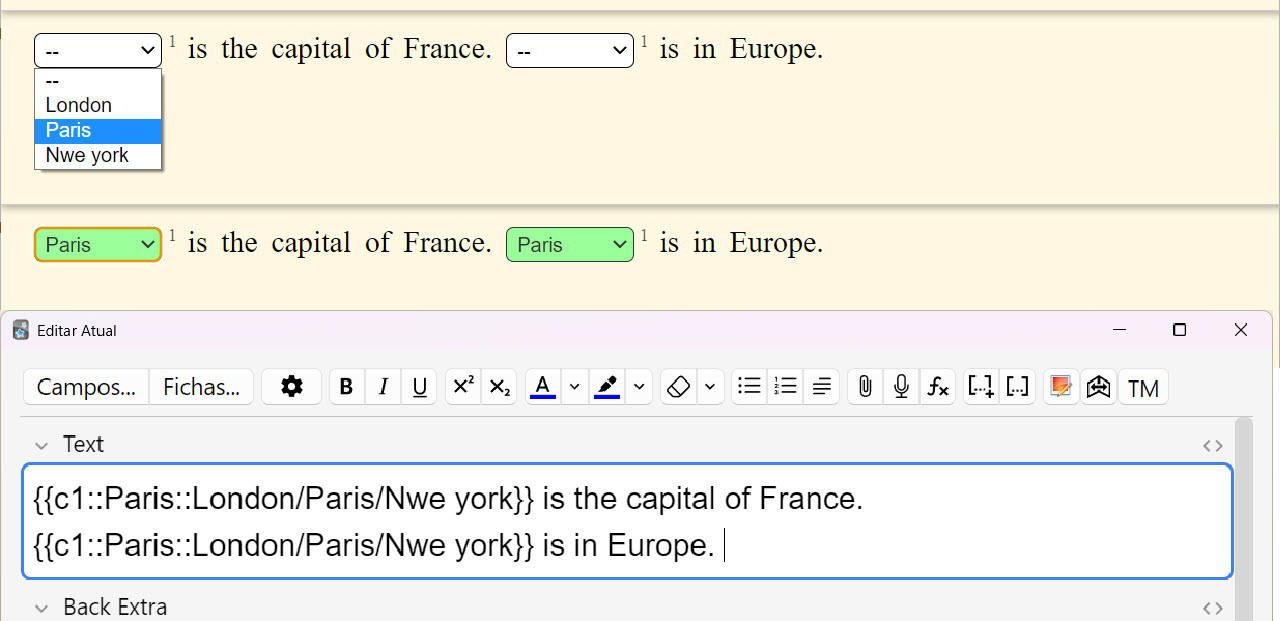
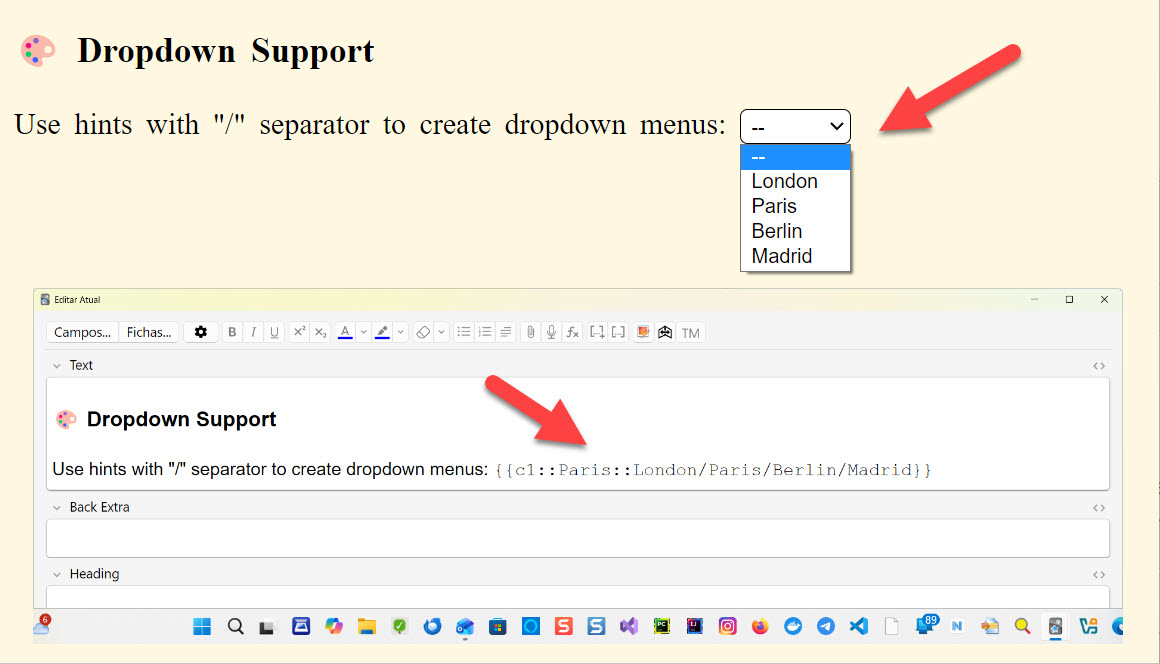
Use hints with "/" separator to create dropdown menus: {{c1::Paris::London/Paris/Berlin/Madrid}}
2026-01-30_18-50-50

πŸ” Duplicate Cloze Autofill

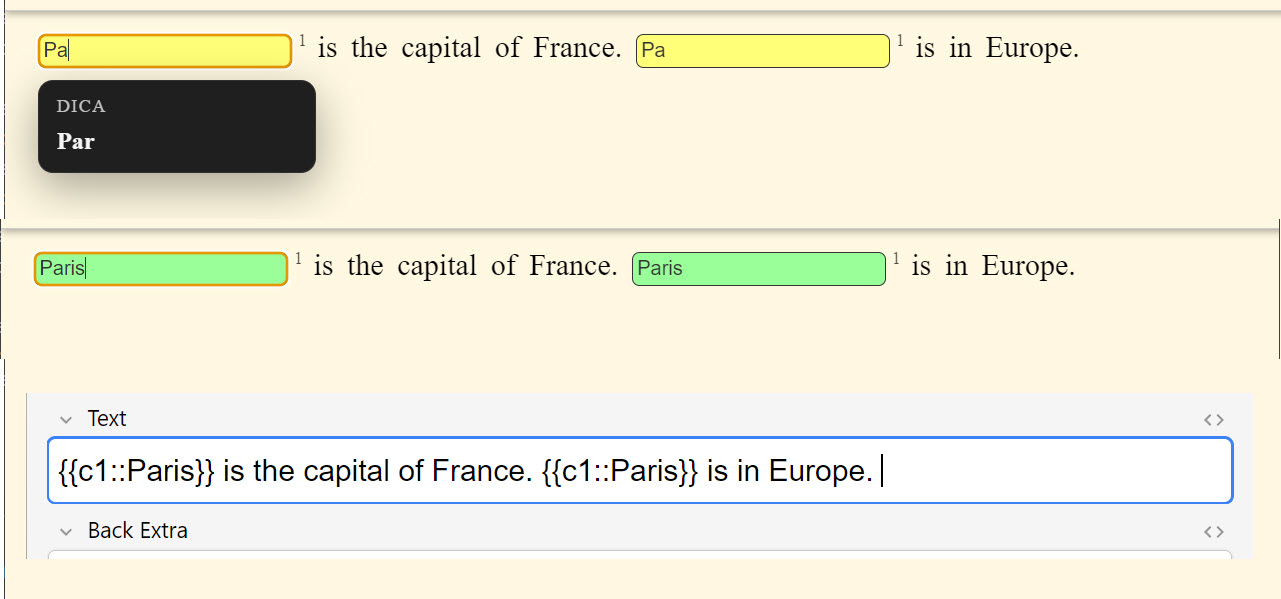
When the same ordinal appears more than once (e.g., c1 repeated), typing in one field instantly mirrors the input in the other(s). A small superscript number appears to the right of each repeated cloze to indicate the shared ordinal.

Example 1: {{c1::Paris}} is the capital of France. {{c1::Paris}} is in Europe. Example 2: {{c1::Paris::London/Paris/Rio de Janeiro}} is the capital of France. {{c1::Paris::London/Paris/Rio de Janeiro}} is in Europe.

How to Use

  1. Create or edit a Cloze note type
  2. In the card template, replace {{cloze:YourField}} with {{type:cloze:YourField}}
  3. Add the filter: {{type:cloze:YourField|fill-blanks}}
  4. Create cloze deletions as usual: {{c1::answer}}
  5. Review your cards - each cloze becomes an input field!

Configuration

Access settings via Tools β†’ Add-ons β†’ Fill the Blanks Expanded β†’ Config

  • Enable/disable instant feedback
  • Case and accent sensitivity
  • Hint delays and behavior
  • And more...

Perfect For

  • πŸ’» Programming & code snippets
  • 🌐 Language learning
  • πŸ“ Math formulas
  • 🧬 Scientific terminology
  • πŸ“ Any content with multiple fill-in-the-blanks

Source & Issues

This Fork: https://github.com/belagrun/anki

Original Project: https://github.com/ssricardo/anki-plugins/tree/master/fill-the-blanks-expanded

Report bugs, request features, or contribute!

Credits & Support

Originally developed by ssricardo

This fork contains additional features and enhancements. All credit for the original concept and implementation goes to ssricardo.

🌐 My Website:
πŸ‘‰ Isabela GrΓΌnevald

πŸ“§ My E-mail:
βœ‰οΈ naveroute@gmail.com

Support the Original Author

If you find this add-on useful, please consider supporting the original creator:

β˜• Buy ssricardo a coffee

More add-ons by ssricardo

README

Anki Plugins

This repository is a fork of the original Anki Plugins project by ssricardo, with additional custom plugins.

Plugins

Plugin Description
Fill the Blanks Expanded Enhanced cloze deletions with input fields
Note Type Export Export and import note types as JSON

Fill the Blanks Expanded

Enhanced cloze deletion add-on with input fields and instant feedback, including:

  • ✨ Progress indicator showing answered/total fields
  • 🎯 Enhanced instant feedback
  • πŸ’‘ Improved hint system
  • 🎨 Additional UI improvements

All new features are built upon the excellent foundation created by the original author.

Example

{{c1::Guten}} {{c2::Morgen}}, wie {{c3::geht}} es {{c4::dir}}?

Das ist {{c5::sehr}} {{c6::schΓΆn}}!
2026-01-30_19-03-16 2026-01-30_19-03-24
2026-01-30_19-03-33 2026-01-30_19-03-47
2026-01-30_19-04-08 2026-01-31_21-24-50
2026-01-31_21-29-45

How it works?

  • Instant Feedback: As you type, each field changes color:

    • 🟨 Yellow: incomplete or incorrect answer
    • 🟩 Green: correct answer
    • πŸŸ₯ Red: completely wrong answer
  • Settings Used:

    • feedback-enabled: true (real-time visual feedback)
    • feedback-ignore-case: false (distinguishes uppercase/lowercase)
    • feedback-ignore-accents: true (ignores accents)

πŸ“Š Progress Indicator

  • Visual counter showing answered/total fields (e.g., "2/5")
  • Located in the top-right corner
  • Turns green when all answers are complete

πŸ’‘ Smart Hints

  • Double-click any field to reveal the answer
  • Ctrl+? to get the next character hint
  • Configurable idle hint delays

🌍 Language Support

  • Ignore case sensitivity option
  • Ignore accents/diacritics option
  • Asian characters support

🎨 Dropdown Support

Use hints with "/" separator to create dropdown menus: {{c1::Paris::London/Paris/Berlin/Madrid}}

2026-01-30_18-50-50

πŸ” Duplicate Cloze Autofill

When the same ordinal appears more than once (e.g., c1 repeated), typing in one field instantly mirrors the input in the other(s). A small superscript number appears to the right of each repeated cloze to indicate the shared ordinal.

Example 1: {{c1::Paris}} is the capital of France. {{c1::Paris}} is in Europe. Example 2: {{c1::Paris::London/Paris/Rio de Janeiro}} is the capital of France. {{c1::Paris::London/Paris/Rio de Janeiro}} is in Europe.

Notes:

  • Autofill only happens for the same ordinal (e.g., c1 with c1).
  • Different ordinals (e.g., c1 and c2) are not linked.

How to Use

  1. Create or edit a Cloze note type
  2. In the card template, replace {{cloze:YourField}} with {{type:cloze:YourField}}
  3. Add the filter: {{type:cloze:YourField|fill-blanks}}
  4. Create cloze deletions as usual: {{c1::answer}}
  5. Review your cards - each cloze becomes an input field!

Configuration

Access settings via Tools β†’ Add-ons β†’ Fill the Blanks Expanded β†’ Config

  • Enable/disable instant feedback
  • Case and accent sensitivity
  • Hint delays and behavior
  • And more...

Perfect For

  • πŸ’» Programming & code snippets
  • 🌐 Language learning
  • πŸ“ Math formulas
  • 🧬 Scientific terminology
  • πŸ“ Any content with multiple fill-in-the-blanks

Original Project

Original Repository: https://github.com/ssricardo/anki-plugins

The original project contains several useful Anki add-ons developed by ssricardo. Please check out the original repository for more great add-ons!

Acknowledgments

Special thanks to ssricardo for creating and maintaining the original Fill the Blanks Expanded add-on. This project would not exist without their excellent work and dedication to the Anki community.

Support the Original Author

If you find this add-on useful, please consider supporting the original author:

Buy ssricardo a coffee

If you feel like supporting their work...

β˜• https://www.buymeacoffee.com/ricardoss

Your support helps maintain and improve these tools for the entire Anki community!


Project Structure

Building

# Generate distribution package (.ankiaddon)
# Fill the Blanks Expanded
python build.py -source 1 -dist

# Note Type Export
python build.py -source 2 -dist

# Install to local Anki (Windows)
python build.py -source 1 -dev  # Fill the Blanks
python build.py -source 2 -dev  # Note Type Export

Note Type Export

Export and import Anki note types (models) as portable JSON files.

Features

  • πŸ“€ Export Note Types: Save your note types to a portable JSON file
  • πŸ“₯ Import Note Types: Load note types from JSON files into your collection
  • ⚠️ Smart Conflict Resolution: Choose how to handle name conflicts:
    • Ask for each conflict
    • Auto-rename with "(imported)" suffix
    • Skip conflicting note types
    • Overwrite existing (if not in use)
  • βœ… Selective Export/Import: Choose exactly which note types to export or import
  • πŸ“‹ Apply to All: Handle multiple conflicts with a single decision

Usage

  1. Export: Go to Tools β†’ Export Note Types...

    • Select note types to export
    • Choose save location
    • Get a portable .json file
  2. Import: Go to Tools β†’ Import Note Types...

    • Select a .json file
    • Preview note types with conflict indicators (⚠️)
    • Configure conflict resolution
    • Import selected note types

JSON Format

{
  "format_version": "1.0",
  "metadata": {
    "exported_at": "2026-02-04T12:00:00Z",
    "anki_version": "24.11",
    "count": 2
  },
  "note_types": [
    {
      "name": "Basic",
      "type": 0,
      "css": ".card { font-family: arial; }",
      "fields": [...],
      "templates": [...]
    }
  ]
}

Limitations (v1.0)

  • Media files in templates/CSS are not exported
  • Deck associations are not preserved

Contact & Support

🌐 My Website:
πŸ‘‰ Isabela GrΓΌnevald

πŸ“§ My E-mail:
βœ‰οΈ naveroute@gmail.com


License

This fork maintains the same license as the original project.